Typrighter: The Typewriter Font That Never Looks the Same Twice
There is a distinct feeling you get when you look at a genuine typewritten page. It isn't the crisp, sterile perfection of a laser printer, nor is it the messy scrawl of a hurried hand. It is something in between—mechanical yet human, structured yet imperfect. As designers and content creators, we often chase that specific "lived-in" aesthetic for projects ranging from indie brand packaging to atmospheric film posters. However, standard typewriter fonts often fall short. If you use a standard digital typeface, the repetition is obvious. The letter 'e' looks exactly the same in "engineer" as it does ten words later. The illusion shatters, and the text looks fake.
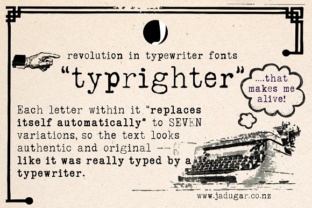
This is exactly the problem Typrighter was built to solve. It is not just another premium font; it is a sophisticated system designed to bring the chaos of analog typing into the digital workspace. The defining feature of this creative font is its use of advanced contextual substitutions. In technical terms, this means the software detects where a letter appears in a sequence and automatically replaces it with one of up to seven distinct variations. You do not have to manually select different glyphs or "randomize" your text in Illustrator. You simply type, and the font does the heavy lifting, ensuring that no two characters ever collide in the exact same way twice. The result is a document that genuinely looks like it was hammered out on a vintage machine.
The Anatomy of an Authentic Typewriter Typeface
When evaluating modern typography, we often look for precision, but Typrighter relies on character. Visually, it strikes a balance between the bold, heavy impact of an ink ribbon and the gritty texture of a mechanical strike. It is a display font with a soul, designed to capture the idiosyncrasies of vintage hardware. You will notice the ink bleeds, the slight misalignment of baseline strikes, and the varying weights of the characters that occur when a key hits the platen with different force.
Because it mimics a physical process, the personality of the font is inherently nostalgic, authentic, and slightly rebellious. It avoids the cold perfection of a sans serif font and the rigid formality of a traditional serif font. Instead, it occupies a unique space alongside handwritten fonts and script fonts, offering a raw, emotional texture. However, unlike a script font which can be difficult to read in long paragraphs, Typrighter maintains the monospaced structure of a classic typewriter, giving it a rhythm that guides the eye comfortably across the page.
Practical Applications: Where Typrighter Shines
Understanding the visual style is one thing, but knowing where to deploy this typeface is where strategy comes into play. As a commercial font, Typrighter is versatile, but it thrives in specific environments where authenticity is the primary goal.
Editorial Design and Publishing
For bloggers, journalists, and publishers, Typrighter is an exceptional tool for editorial design. It works beautifully for pull quotes, chapter headers, or subheadings in a magazine layout. If you are designing a book cover for a mystery novel or a memoir, this font instantly signals to the reader that the content is narrative-driven and personal. It adds a layer of storytelling before the reader has even processed the words.
Branding and Logo Design
In the realm of logo design, differentiation is key. Many startups and small businesses default to clean sans serif fonts, which can lead to a homogenized look across the market. If your brand identity leans toward the artisanal, the vintage, or the counter-culture, Typrighter offers a distinct voice. Imagine a craft coffee roaster, an independent record label, or a boutique agency using this typeface. It communicates that the brand values craft, history, and attention to detail. It suggests that there are real humans behind the logo, not just an algorithm.
Packaging and Print
Packaging design relies heavily on tactile impressions. Since Typrighter mimics the look of ink on paper, it translates incredibly well to physical print. Whether you are designing labels for a micro-brewery, tags for handmade clothing, or stationery sets, the font holds its integrity on textured stocks. It pairs exceptionally well with kraft paper and matte finishes, reinforcing the "homemade" or "bespoke" quality of the product.
Strategic Pairings and Readability
One of the most practical skills in a designer's toolkit is font pairing. Typrighter has a strong personality, so pairing it requires a bit of finesse to maintain readability and visual hierarchy.
Because Typrighter is a monospaced font (where every character takes up the same width), it has a specific rhythm. To create a balanced layout, pair it with a proportional font for your body copy. A clean, geometric sans serif font works wonders here. The modernity of the sans serif will contrast with the vintage vibe of Typrighter, creating a dynamic tension that looks professional. Alternatively, pairing it with a simple, readable serif font can create a "classic literature" aesthetic that feels timeless.
Regarding readability, it is important to treat Typrighter as a display font for most digital applications. While it is legible, the textured nature of the characters can cause eye strain if used for 14-point body text on a website. It is best used for headers, hero text, and call-outs in web design. However, for short-form social media graphics, such as Instagram stories or quote cards, it is perfect. It grabs attention in a busy feed because it looks different from the standard system fonts most people use.
Making the Decision: Is Typrighter Right for Your Project?
When choosing a commercial font, you are investing in a design asset. To evaluate if Typrighter fits your project, consider the emotional response you want to evoke. If you need to convey futuristic efficiency, this is not the font. But if you need to convey grit, history, narrative, or authenticity, it is likely the perfect candidate.
Before finalizing your design, always test the font in context. Type out actual sentences from your project rather than just "The quick brown fox." Because of the contextual alternates, you want to see how the letters interact with your specific copy. Check the kerning (spacing) to ensure it doesn't feel too loose or too tight for your layout.
Finally, review the licensing. Since this is a premium font with complex programming, ensure you have the correct license for your intended use—whether that is for a single client project, a logo that will be trademarked, or a mass-produced product line. By integrating Typrighter into your workflow, you move beyond generic typography and start creating designs that feel genuinely lived-in and real. It bridges the gap between digital precision and analog soul, giving your work a voice that is unmistakably original.